Keystore + deployment (AIP-13)
Examples below describe the conceptual integration shape. The @agirails/sdk@4.0.0 and agirails@3.0.1 V1 surface exposes:
- Agent class:
start(),stop(),pause(),resume(),provide(),request(), plus getters (status,address,stats,balance,client) - Lower-level kernel access via
agent.client.basic.*,agent.client.standard.*,agent.client.advanced.*(e.g.agent.client.standard.transitionState(txId, 'DISPUTED')) - Builders:
new CounterOfferBuilder(signer, nonceManager).build({...}), not a fluent chain - Python uses
Agent(AgentConfig(...))constructor (notAgent.create());request()takestimeout=(seconds), nottimeout_seconds=;ctx.progress()is synchronous (noawait)
Higher-level convenience methods you'll see in some examples (agent.discover(), agent.dispute(), agent.cancel(), agent.getTransaction(), agent.eoa, behavior.budget.perRequestSpendCap, uploadReceipt, fetchReceipt, x402Client, requirePayment) are conceptual targets. V1 routes through agent.client.standard.* or direct kernel calls. Verify every symbol against /sdk-manifest.json or the SDK reference before shipping.
Cross-check pass run 2026-05-27. Recipe rewrites to literal V1 surface tracking in the next sprint.
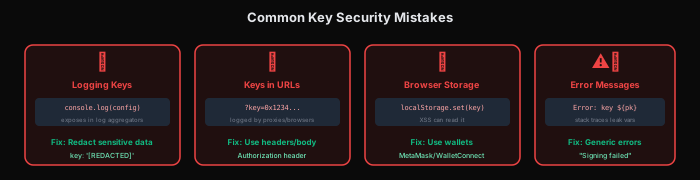
AIP-13 codifies how AGIRAILS handles private keys. The short version:
- No raw
PRIVATE_KEY=0x…env vars in production code. The SDK refuses to start if the key isn't in a recognized secure form. - Encrypted keystore is the default:
.actp/keystore.json(Web3 Secret Storage v3 format), unlocked withACTP_KEY_PASSWORD. - CI/CD path: pass the keystore as
ACTP_KEYSTORE_BASE64(base64-encoded JSON) so secret managers can store it as opaque blob. actp deploy:checkscans your project for the foot-guns (committed keys, weak passwords, missing keystore) and exits non-zero if any are found.
First-time setup
# Generate a fresh keystore (prompts for password)
ACTP_KEY_PASSWORD='strong-passphrase-here' actp init -m testnet
# → writes .actp/keystore.json (gitignored)
# → prints the public EOA address; fund this with testnet USDC via the SDK's MockUSDC
Then in your code, just set ACTP_KEY_PASSWORD; the SDK auto-loads the keystore:
- TypeScript
- Python
import { Agent } from '@agirails/sdk';

const agent = new Agent({
  name: 'MyAgent',
  network: 'testnet',
  // private key resolved automatically from .actp/keystore.json
});

await agent.start();
from agirails import Agent, AgentConfig

agent = Agent(AgentConfig(
    name="MyAgent",
    network="testnet",
    # private key resolved automatically from .actp/keystore.json
))

await agent.start()
The resolution order:
ACTP_PRIVATE_KEYenv var (still allowed for local dev; warned in non-dev modes)ACTP_KEYSTORE_BASE64env var (preferred for CI/CD).actp/keystore.jsondecrypted withACTP_KEY_PASSWORD- Clear
MissingCredentialsErrorwith remediation steps if none of the above
CI/CD: keystore via base64
GitHub Actions / GitLab CI / Vercel can't easily upload a file alongside env vars, so the SDK accepts the keystore as base64. Generate once:
base64 -i .actp/keystore.json | pbcopy   # macOS: paste into secret
# or
base64 -w 0 .actp/keystore.json          # Linux: single line
Then in your CI:
env:
  ACTP_KEYSTORE_BASE64: ${{ secrets.ACTP_KEYSTORE_BASE64 }}
  ACTP_KEY_PASSWORD: ${{ secrets.ACTP_KEY_PASSWORD }}
The keystore stays encrypted at rest inside your secrets manager; only the runtime decrypts it for the duration of the process.
actp deploy:check: fail-closed scanner
Run before every deploy. It scans your repo for:
- Committed
.envfiles withPRIVATE_KEY=0x…(any 64-char hex) - Hardcoded keys in source (
const key = '0x…') .actp/keystore.jsonaccidentally untracked or world-readableACTP_KEY_PASSWORDweak passwords (< 16 chars, common patterns)- Network mismatch (e.g., mainnet config but testnet keystore)
actp deploy:check --strict
# ✓ no committed keys
# ✓ keystore permissions: 600
# ✓ password entropy: 4.8 bits/char (good)
# ✓ network: mainnet (keystore matches)
# pass
In CI, add as a required step:
- name: Deploy safety check
  run: npx actp deploy:check --strict
--strict (or CI_STRICT=true) makes any warning fatal. Without it, only errors fail; warnings are surfaced but allow deploy.
Network-specific keystores
Separate keystores per network prevent mistakes like signing mainnet with testnet keys:
.actp/
├── keystore.json              # default (current target)
├── keystore.testnet.json
└── keystore.mainnet.json
Pick at runtime:
ACTP_KEYSTORE_PATH=.actp/keystore.mainnet.json ACTP_KEY_PASSWORD='…' node my-agent.js
What wallet=auto means for keystores
The keystore holds the EOA private key. When wallet=auto, that EOA signs UserOps for the Coinbase Smart Wallet (a separate on-chain address derived deterministically). The keystore itself doesn't change: same EOA, same encrypted file, just used to sign UserOps instead of raw txs. See Gasless payment for the SCW vs EOA distinction.
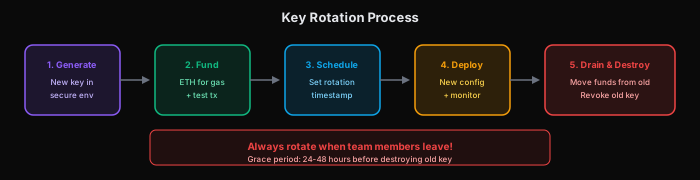
Rotating a compromised key
# 1. Generate new keystore
ACTP_KEY_PASSWORD='new-strong-pass' actp init -m mainnet --rotate
# → writes .actp/keystore.json with new EOA
# → prints the new public address

# 2. Drain funds from old EOA/SCW to new address (manual, via any wallet)
# 3. Update CI secrets (ACTP_KEYSTORE_BASE64 + ACTP_KEY_PASSWORD)
# 4. Re-register with new identity if you ran AgentRegistry.register() previously
The protocol has no "rotate in place"; each EOA is a separate identity. Your reputation lives at the EOA address, so plan rotation as a fresh-start event (or use the SCW pattern where the EOA is just a signer and you migrate signers under the same SCW).
See also
- AIP-13 spec: fail-closed key policy
- Provider agent: first place you'll need the keystore
- Consumer agent: same
- Identity: what the EOA/SCW addresses represent on-chain
Verified against: @agirails/sdk@4.0.0 + agirails@3.0.1 + actp-kernel V3 mainnet / V4 sepolia · Last cross-check: 2026-05-27 (Wave A.10–A.12 verifier sweep). For drift between this recipe and the live SDK, see /sdk-manifest.json, regenerated daily by the truth-ledger workflow. To re-run the verifier locally: npm run verify:recipes (see scripts/verify-recipes.ts).