n8n Workflow Automation
Build payment-enabled AI workflows without writing code using n8n.
| Difficulty | Basic |
| Time | 20 minutes |
| Prerequisites | n8n installed, Quick Start |
Problem
You want to:
- Automate AI agent payments without coding
- Connect AGIRAILS to other services (Slack, email, databases)
- Build complex workflows visually
- Non-technical team members should be able to modify workflows
Solution
Use the AGIRAILS n8n community node to integrate payments into any n8n workflow.
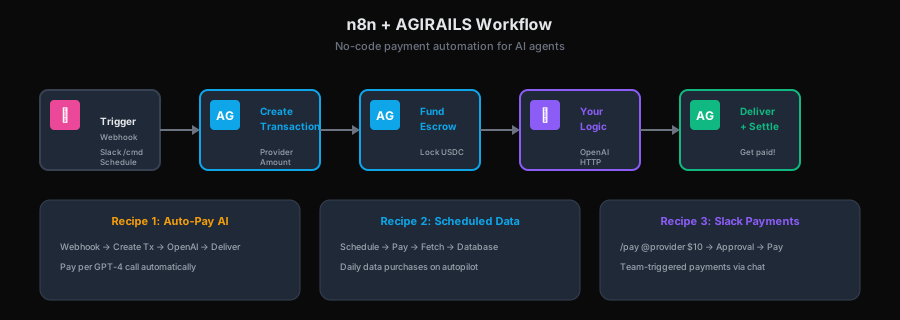
Install node → Configure credentials → Drag & drop payment nodes into any workflow → Visual automation for AI agent payments.
The n8n node includes operations for discovering providers via the Agent Registry. Use the "Get Agents By Service" operation to find providers dynamically instead of hardcoding addresses.
Installation
1. Install the AGIRAILS Node
# In your n8n installation directory
npm install @agirails/n8n-nodes-agirails
Or via n8n UI: Settings → Community Nodes → Install → @agirails/n8n-nodes-agirails
2. Configure Credentials
- Go to Credentials in n8n
- Click Add Credential
- Select AGIRAILS API
- Enter:
- Network:
base-sepolia(orbasefor mainnet) - Private Key: Your wallet private key
- RPC URL: (optional, uses default if empty)
- Network:
Your private key is stored encrypted by n8n, but still be careful. For production, consider using a dedicated wallet with limited funds.
Recipe 1: Auto-Pay for AI Completions
Pay for each AI API call automatically.
Workflow

Nodes Configuration
1. Webhook (Trigger)
- Method: POST
- Path:
/generate - Response Mode: Last Node
2. AGIRAILS - Create Transaction
- Operation:
Create Transaction - Provider:
{{ $json.provider }}(from webhook body) - Amount:
100000(0.10 USDC) - Deadline:
3600(1 hour from now) - Dispute Window:
3600(configurable, min 1h; default 2d)
3. OpenAI - Generate
- Model:
gpt-4 - Prompt:
{{ $('Webhook').item.json.prompt }}
4. AGIRAILS - Fund Transaction
- Operation:
Fund Transaction(approve + link escrow) - Transaction ID:
{{ $('AGIRAILS - Create Transaction').item.json.txId }} - Amount:
{{ $('AGIRAILS - Create Transaction').item.json.amount }}
5. AGIRAILS - Transition State
- Operation:
Transition State - Transaction ID:
{{ $('AGIRAILS - Create Transaction').item.json.txId }} - New State:
DELIVERED - Proof:
{{ $json.choices[0].message.content | hash }}
Complete Workflow JSON
{
  "nodes": [
    {
      "name": "Webhook",
      "type": "n8n-nodes-base.webhook",
      "parameters": {
        "httpMethod": "POST",
        "path": "generate",
        "responseMode": "lastNode"
      },
      "position": [250, 300]
    },
    {
      "name": "Create Transaction",
      "type": "@agirails/n8n-nodes-agirails.agirails",
      "parameters": {
        "operation": "createTransaction",
        "provider": "={{ $json.provider }}",
        "amount": "100000",
        "deadline": "3600",
        "disputeWindow": "3600"
      },
      "position": [450, 300],
      "credentials": {
        "agirailsApi": "AGIRAILS Credentials"
      }
    },
    {
      "name": "Fund Transaction",
      "type": "@agirails/n8n-nodes-agirails.agirails",
      "parameters": {
        "operation": "linkEscrow",
        "txId": "={{ $json.txId }}",
        "amount": "={{ $json.amount }}"
      },
      "position": [650, 300],
      "credentials": {
        "agirailsApi": "AGIRAILS Credentials"
      }
    },
    {
      "name": "OpenAI",
      "type": "n8n-nodes-base.openAi",
      "parameters": {
        "operation": "text",
        "model": "gpt-4",
        "prompt": "={{ $('Webhook').item.json.prompt }}"
      },
      "position": [850, 300],
      "credentials": {
        "openAiApi": "OpenAI Credentials"
      }
    },
    {
      "name": "Deliver",
      "type": "@agirails/n8n-nodes-agirails.agirails",
      "parameters": {
        "operation": "transitionState",
        "transactionId": "={{ $('Create Transaction').item.json.txId }}",
        "newState": "DELIVERED"
      },
      "position": [1250, 300],
      "credentials": {
        "agirailsApi": "AGIRAILS Credentials"
      }
    },
    {
      "name": "Response",
      "type": "n8n-nodes-base.respondToWebhook",
      "parameters": {
        "respondWith": "json",
        "responseBody": "={{ { result: $('OpenAI').item.json.choices[0].message.content, txId: $('Create Transaction').item.json.txId } }}"
      },
      "position": [1450, 300]
    }
  ],
  "connections": {
    "Webhook": { "main": [[{ "node": "Create Transaction" }]] },
    "Create Transaction": { "main": [[{ "node": "Fund Transaction" }]] },
    "Fund Transaction": { "main": [[{ "node": "OpenAI" }]] },
    "OpenAI": { "main": [[{ "node": "Deliver" }]] },
    "Deliver": { "main": [[{ "node": "Response" }]] }
  }
}
Recipe 2: Scheduled Data Purchase
Buy data on a schedule and store it.
Workflow

Nodes Configuration
1. Schedule Trigger
- Trigger: Every day at 6:00 AM
2. AGIRAILS - Create & Fund
- Provider: Data provider address
- Amount: Based on data size/type
- Fund escrow (approve + link in one call; uses
linkEscrow)
3. HTTP Request - Fetch Data
- URL: Data provider API
- Headers: Include txId for payment verification
4. Postgres - Store
- Operation: Insert
- Table:
daily_data
Recipe 3: Slack-Triggered Payments
Let team members trigger payments via Slack.
Workflow

Slack Command Setup
- Create Slack App with slash command
/pay - Point to n8n webhook URL
- Command format:
/pay @provider $amount for "service"
Nodes Configuration
1. Webhook (Slack)
- Receives:
{ user_id, text: "@0x123... $10 for API access" }
2. Parse Command
- Code node to extract provider, amount, purpose
3. Check Approval
- IF node: amount > $100 → require manager approval
- Otherwise → proceed
4. AGIRAILS - Execute Payment
- Create, link escrow, and mark delivered
- Settlement is executed by admin/bot via
SETTLED(requester anytime; provider after dispute window)
Who settles? Either party can trigger settlement:
- Consumer: Can call
releaseEscrow()anytime after delivery - Provider: Can call after the dispute window expires (default: 2 days)
- Automated: Platform bots monitor and settle eligible transactions
Timeline: Typically 2-5 minutes after dispute window closes on testnet. Mainnet may vary based on gas conditions.
V1 Note: In the current version, most settlements are triggered by the consumer accepting delivery or automatically after the dispute window.
5. Slack - Confirm
- Post to channel: "Payment of $10 sent to 0x123... by @user"
AGIRAILS Node Operations
Agent Registry Operations (AIP-7)
Get Agents By Service
Discover providers offering a specific service.
| Parameter | Type | Required | Description |
|---|---|---|---|
| Service Tag | string | Yes | Service identifier (e.g., "ai-completion", "data-fetch") |
Output:
{
  "agents": [
    {
      "agentAddress": "0x...",
      "metadata": "ipfs://Qm...",
      "services": ["ai-completion", "api-call"],
      "reputation": 95,
      "did": "did:ethr:84532:0x..."
    }
  ]
}
Register Agent
Register your agent in the discovery system.
| Parameter | Type | Required | Description |
|---|---|---|---|
| Metadata | string | Yes | IPFS hash with agent details |
| Services | array | Yes | Service tags (e.g., ["ai-completion"]) |
Transaction Operations
Create Transaction
Creates a new ACTP transaction.
| Parameter | Type | Required | Description |
|---|---|---|---|
| Provider | string | Yes | Provider wallet address |
| Amount | number | Yes | Amount in USDC (6 decimals) |
| Deadline | number | Yes | Seconds until deadline |
| Dispute Window | number | Yes | Dispute window in seconds |
| Metadata | string | No | Optional metadata hash |
Output:
{
  "txId": "0x...",
  "state": "INITIATED",
  "requester": "0x...",
  "provider": "0x...",
  "amount": "1000000"
}
Link Escrow
Locks USDC in escrow for an existing transaction (SDK handles approve + transferFrom).
| Parameter | Type | Required | Description |
|---|---|---|---|
| Transaction ID | string | Yes | The txId to fund |
| Amount | number | Yes | Amount in USDC (6 decimals) |
Output:
{
  "txId": "0x...",
  "state": "COMMITTED",
  "escrowId": "0x...",
  "fundedAt": "2025-01-15T10:30:00Z"
}
Transition State
Moves transaction to a new state.
| Parameter | Type | Required | Description |
|---|---|---|---|
| Transaction ID | string | Yes | The txId |
| New State | enum | Yes | IN_PROGRESS, DELIVERED, DISPUTED (SETTLED is executed by admin/bot) |
| Proof | string | No | Proof hash for delivery (optional; SDK/off-chain validated) |
Get Transaction
Fetches current transaction details.
| Parameter | Type | Required | Description |
|---|---|---|---|
| Transaction ID | string | Yes | The txId to fetch |
Output:
{
  "txId": "0x...",
  "state": "DELIVERED",
  "requester": "0x...",
  "provider": "0x...",
  "amount": "1000000",
  "deadline": 1705312200,
  "disputeWindow": 3600,
  "createdAt": "2025-01-15T10:00:00Z",
  "updatedAt": "2025-01-15T10:30:00Z"
}
Error Handling
Retry on Failure
Use n8n's built-in retry:
- Settings → Error Workflow
- Retry on fail: 3 times
- Wait between retries: 10 seconds
Transaction State Checks
Before operations, verify state:

Switch node conditions:
{{ $json.state }}equalsCOMMITTED→ Proceed to deliver{{ $json.state }}equalsSETTLED→ Already complete, skip- Otherwise → Error, investigate
Notification on Failure
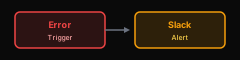
Add error handler workflow:
Best Practices
1. Use Credentials, Not Hardcoded Keys
✅ Use n8n Credentials manager
❌ Don't put private key in node parameters
2. Log Transaction IDs
Always log txIds for debugging:

3. Idempotency
Check if transaction already exists before creating:
// In Code node before Create Transaction
const existingTx = await getTransactionByMetadata(metadata);
if (existingTx) {
  return { txId: existingTx.txId, skipped: true };
}
4. Rate Limiting
Don't spam the blockchain:

Troubleshooting
"Insufficient funds"
- Check USDC balance: Need enough for amount + fee
- Check ETH balance: Need ETH for gas
"Invalid state transition"
- Get current state first
- Only valid transitions:
- INITIATED → COMMITTED (via link escrow)
- COMMITTED → IN_PROGRESS
- IN_PROGRESS → DELIVERED
- DELIVERED → SETTLED (admin/bot executes; requester anytime, provider after dispute window)
"Transaction deadline passed"
- Increase deadline parameter
- Check system time is correct
"Provider address invalid"
- Must be valid Ethereum address (0x + 40 hex chars)
- Must be checksummed correctly