Secure Key Management
Protect your private keys in production. Because one leaked key = total loss.
| Difficulty | Intermediate |
| Time | 25 minutes |
| Prerequisites | Basic understanding of environment variables and cloud services |
Problem
Your AI agent needs a private key to sign transactions, but:
- Hardcoded keys get leaked in git commits
- Environment variables can be exposed in logs
- Single keys are single points of failure
- Keys in memory can be dumped
Unlike passwords, you can't reset a private key. If someone gets it, they can drain your wallet instantly. No recovery.
Solution
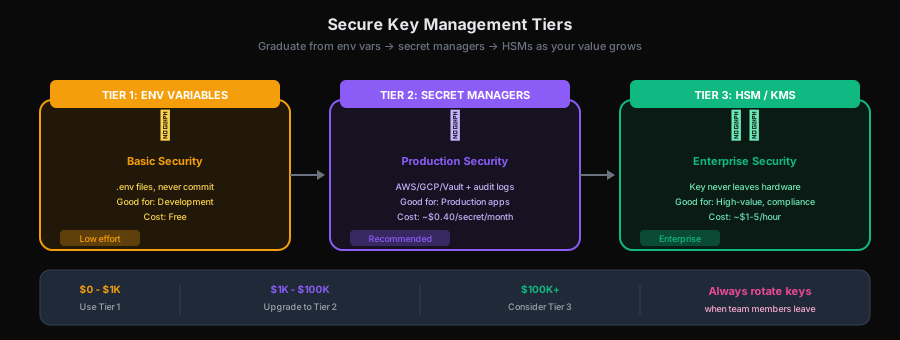
Start with env vars (Tier 1) → Graduate to secret managers (Tier 2) → Use HSMs for high-value ops (Tier 3).
Solution Tiers
| Tier | Security | Complexity | Best For |
|---|---|---|---|
| Tier 1: Environment Variables | Basic | Low | Development, small projects |
| Tier 2: Secret Managers | High | Medium | Production, single cloud |
| Tier 3: Hardware Security Modules | Very High | High | Enterprise, high-value |
Tier 1: Environment Variables (Minimum)
The baseline. Better than hardcoding, but just barely.
Setup
# .env file (NEVER commit this)
PRIVATE_KEY=0x...your_private_key...

# .gitignore (ALWAYS include)
.env
.env.*
*.pem
*.key
Code
- TypeScript
- Python
// Level 2: Advanced API - Direct protocol control
import { ACTPClient } from '@agirails/sdk';
import 'dotenv/config';

async function main() {
  // ❌ Never do this
  // const privateKey = '0x1234...';

  // ✅ Load from environment
  const privateKey = process.env.PRIVATE_KEY;

  if (!privateKey) {
    throw new Error('PRIVATE_KEY environment variable not set');
  }

  // Validate format before use
  if (!privateKey.startsWith('0x') || privateKey.length !== 66) {
    throw new Error('Invalid private key format');
  }

  const client = await ACTPClient.create({
    mode: 'testnet',
    requesterAddress: wallet.address,
    privateKey: privateKey
  });

  // Clear from memory when done (doesn't guarantee security, but helps)
  // Note: JavaScript doesn't have secure memory clearing
}
# Level 2: Advanced API - Direct protocol control
import os
from agirails import ACTPClient
from dotenv import load_dotenv

def main():
    # Load from .env file
    load_dotenv()

    # ✅ Load from environment
    private_key = os.getenv("PRIVATE_KEY")

    if not private_key:
        raise Exception("PRIVATE_KEY environment variable not set")

    # Validate format
    if not private_key.startswith("0x") or len(private_key) != 66:
        raise Exception("Invalid private key format")

    client = ACTPClient(
        mode='testnet',
        requester_address=os.environ.get("REQUESTER_ADDRESS"),
        private_key=private_key
    )

    # Use client...

    # Clear from memory when done (limited in Python, but good practice)
    private_key = None

if __name__ == "__main__":
    main()
Gotchas
-
Docker: Pass via
-eflag, not in Dockerfiledocker run -e PRIVATE_KEY=$PRIVATE_KEY myagent -
Logs: Never log the key
- TypeScript
- Python
// ❌ This will leak your key
console.log('Starting with config:', process.env);

// ✅ Redact sensitive values
console.log('Starting with config:', {
  ...process.env,
  PRIVATE_KEY: process.env.PRIVATE_KEY ? '[REDACTED]' : 'NOT SET'
});
import os

# ❌ This will leak your key
print(f"Starting with config: {os.environ}")

# ✅ Redact sensitive values
safe_env = {k: ('[REDACTED]' if 'KEY' in k else v) for k, v in os.environ.items()}
print(f"Starting with config: {safe_env}")
- Error messages: Don't include key in errors
- TypeScript
- Python
// ❌ Bad
throw new Error(`Failed with key ${privateKey}`);

// ✅ Good
throw new Error('Transaction signing failed');
# ❌ Bad
raise Exception(f"Failed with key {private_key}")

# ✅ Good
raise Exception("Transaction signing failed")
Tier 2: Cloud Secret Managers (Recommended)
Use your cloud provider's secret management service.
- Audit logs - See who accessed what, when
- Rotation - Change keys without redeploying
- Access control - Fine-grained IAM permissions
- Encryption at rest - Keys encrypted when stored
- No keys in code - Fetched at runtime only
AWS Secrets Manager
- TypeScript
- Python
// Level 2: Advanced API - Direct protocol control
import {
  SecretsManagerClient,
  GetSecretValueCommand
} from '@aws-sdk/client-secrets-manager';
import { ACTPClient } from '@agirails/sdk';

async function getPrivateKey(): Promise<string> {
  const client = new SecretsManagerClient({ region: 'us-east-1' });

  const response = await client.send(
    new GetSecretValueCommand({
      SecretId: 'agirails/production/private-key'
    })
  );

  if (!response.SecretString) {
    throw new Error('Secret not found');
  }

  const secret = JSON.parse(response.SecretString);
  return secret.privateKey;
}

async function main() {
  const privateKey = await getPrivateKey();

  const client = await ACTPClient.create({
    mode: 'testnet',
    requesterAddress: wallet.address,
    privateKey: privateKey
  });

  // Use client...
}
# Level 2: Advanced API - Direct protocol control
import os, json
import boto3
from agirails import ACTPClient

def get_private_key() -> str:
    client = boto3.client('secretsmanager', region_name='us-east-1')

    response = client.get_secret_value(SecretId='agirails/production/private-key')

    if 'SecretString' not in response:
        raise Exception("Secret not found")

    secret = json.loads(response['SecretString'])
    return secret['privateKey']

def main():
    private_key = get_private_key()

    client = ACTPClient(
        mode='testnet',
        requester_address=os.environ.get("REQUESTER_ADDRESS"),
        private_key=private_key
    )

    # Use client...

if __name__ == "__main__":
    main()
Setup:
# Create secret
aws secretsmanager create-secret \
  --name agirails/production/private-key \
  --secret-string '{"privateKey":"0x..."}'

# IAM policy for your service
{
  "Version": "2012-10-17",
  "Statement": [{
    "Effect": "Allow",
    "Action": "secretsmanager:GetSecretValue",
    "Resource": "arn:aws:secretsmanager:*:*:secret:agirails/*"
  }]
}
Google Cloud Secret Manager
- TypeScript
- Python
// Level 2: Advanced API - Direct protocol control
import { SecretManagerServiceClient } from '@google-cloud/secret-manager';
import { ACTPClient } from '@agirails/sdk';

async function getPrivateKey(): Promise<string> {
  const client = new SecretManagerServiceClient();

  const [version] = await client.accessSecretVersion({
    name: 'projects/my-project/secrets/agirails-private-key/versions/latest'
  });

  const payload = version.payload?.data?.toString();
  if (!payload) {
    throw new Error('Secret not found');
  }

  return payload;
}
# Level 2: Advanced API - Direct protocol control
from google.cloud import secretmanager
from agirails import ACTPClient

def get_private_key() -> str:
    client = secretmanager.SecretManagerServiceClient()

    name = "projects/my-project/secrets/agirails-private-key/versions/latest"
    response = client.access_secret_version(request={"name": name})

    payload = response.payload.data.decode("UTF-8")
    if not payload:
        raise Exception("Secret not found")

    return payload

def main():
    private_key = get_private_key()

    client = ACTPClient(
        mode='testnet',
        requester_address=os.environ.get("REQUESTER_ADDRESS"),
        private_key=private_key
    )

    # Use client...
HashiCorp Vault
- TypeScript
- Python
// Level 2: Advanced API - Direct protocol control
import Vault from 'node-vault';
import { ACTPClient } from '@agirails/sdk';

async function getPrivateKey(): Promise<string> {
  const vault = Vault({
    apiVersion: 'v1',
    endpoint: process.env.VAULT_ADDR,
    token: process.env.VAULT_TOKEN
  });

  const result = await vault.read('secret/data/agirails/private-key');
  return result.data.data.privateKey;
}
# Level 2: Advanced API - Direct protocol control
import os
import hvac
from agirails import ACTPClient

def get_private_key() -> str:
    client = hvac.Client(
        url=os.environ["VAULT_ADDR"],
        token=os.environ["VAULT_TOKEN"]
    )

    result = client.secrets.kv.v2.read_secret_version(
        path="agirails/private-key"
    )
    return result["data"]["data"]["privateKey"]

def main():
    private_key = get_private_key()

    client = ACTPClient(
        mode='testnet',
        requester_address=os.environ.get("REQUESTER_ADDRESS"),
        private_key=private_key
    )

    # Use client...
Benefits
- Audit logs: See who accessed what, when
- Rotation: Change keys without redeploying
- Access control: Fine-grained IAM permissions
- Encryption at rest: Keys encrypted when stored
- No keys in code or config: Fetched at runtime
Tier 3: Hardware Security Modules (Enterprise)
For high-value operations where keys should never exist outside secure hardware.
HSMs are expensive (~$1-5/hour) and complex. Only use if you're handling significant value or have compliance requirements (FIPS 140-2, PCI-DSS).
AWS CloudHSM / KMS
The private key never leaves the HSM. You send data to sign, get signature back.
- TypeScript
- Python
import { KMSClient, SignCommand } from '@aws-sdk/client-kms';
import { ethers } from 'ethers';

class KMSSigner extends ethers.AbstractSigner {
  private kmsClient: KMSClient;
  private keyId: string;
  private _address: string;

  constructor(provider: ethers.Provider, keyId: string) {
    super(provider);
    this.kmsClient = new KMSClient({ region: 'us-east-1' });
    this.keyId = keyId;
  }

  async getAddress(): Promise<string> {
    if (!this._address) {
      // Derive address from KMS public key
      this._address = await this.deriveAddress();
    }
    return this._address;
  }

  async signMessage(message: string | Uint8Array): Promise<string> {
    const hash = ethers.hashMessage(message);
    return this.signDigest(hash);
  }

  async signTransaction(tx: ethers.TransactionRequest): Promise<string> {
    const serialized = ethers.Transaction.from(tx).unsignedSerialized;
    const hash = ethers.keccak256(serialized);
    const signature = await this.signDigest(hash);
    return ethers.Transaction.from({ ...tx, signature }).serialized;
  }

  private async signDigest(digest: string): Promise<string> {
    const response = await this.kmsClient.send(
      new SignCommand({
        KeyId: this.keyId,
        Message: Buffer.from(digest.slice(2), 'hex'),
        MessageType: 'DIGEST',
        SigningAlgorithm: 'ECDSA_SHA_256'
      })
    );

    // Convert KMS signature to Ethereum format
    return this.kmsSignatureToEth(response.Signature!);
  }

  private kmsSignatureToEth(signature: Uint8Array): string {
    // KMS returns DER-encoded signature, convert to r,s,v format
    // Implementation details omitted for brevity
    // See: https://github.com/aws-samples/aws-kms-ethereum-accounts
  }
}

// Usage with AGIRAILS
async function main() {
  const provider = new ethers.JsonRpcProvider('https://sepolia.base.org');
  const signer = new KMSSigner(provider, 'alias/agirails-signing-key');

  // ACTPClient would need to accept a Signer instead of privateKey
  // This requires SDK modification or direct contract interaction
}
import boto3
from eth_account.messages import encode_defunct
from web3 import Web3
from web3.auto import w3

class KMSSigner:
    """
    Custom signer that uses AWS KMS for signing.
    The private key never leaves the HSM.
    """

    def __init__(self, key_id: str, region: str = "us-east-1"):
        self.kms_client = boto3.client("kms", region_name=region)
        self.key_id = key_id
        self._address = None

    @property
    def address(self) -> str:
        if not self._address:
            # Derive address from KMS public key
            self._address = self._derive_address()
        return self._address

    def _derive_address(self) -> str:
        # Get public key from KMS and derive Ethereum address
        response = self.kms_client.get_public_key(KeyId=self.key_id)
        # Parse the public key and derive address
        # Implementation details omitted for brevity
        pass

    def sign_message(self, message: str) -> str:
        message_hash = encode_defunct(text=message)
        return self._sign_digest(message_hash.body)

    def sign_transaction(self, transaction: dict) -> str:
        # Serialize and hash the transaction
        tx_hash = w3.keccak(text=str(transaction))  # Simplified
        signature = self._sign_digest(tx_hash)
        return signature

    def _sign_digest(self, digest: bytes) -> str:
        response = self.kms_client.sign(
            KeyId=self.key_id,
            Message=digest,
            MessageType="DIGEST",
            SigningAlgorithm="ECDSA_SHA_256"
        )

        # Convert KMS signature (DER-encoded) to Ethereum format (r, s, v)
        return self._kms_signature_to_eth(response["Signature"])

    def _kms_signature_to_eth(self, signature: bytes) -> str:
        # KMS returns DER-encoded signature, convert to r,s,v format
        # Implementation details omitted for brevity
        # See: https://github.com/aws-samples/aws-kms-ethereum-accounts
        pass


# Usage with AGIRAILS
def main():
    signer = KMSSigner(key_id="alias/agirails-signing-key")

    # For AGIRAILS, you would need to use the signer with web3.py
    # to interact with contracts directly, as the SDK expects a private key
    w3 = Web3(Web3.HTTPProvider("https://sepolia.base.org"))

    # Sign a message
    signature = signer.sign_message("Hello AGIRAILS")
    print(f"Signed by: {signer.address}")
Benefits
- Key never exposed: Private key exists only in tamper-proof hardware
- FIPS 140-2 compliance: Required for some regulatory environments
- Audit everything: HSM logs all signing operations
- Multi-party control: Require multiple approvals for key use
Drawbacks
- Cost: HSMs are expensive (~$1-5 per hour)
- Latency: Each signature requires HSM call (~50-100ms)
- Complexity: Significant integration work
- Vendor lock-in: Tied to specific cloud provider
Key Rotation Strategy
Why Rotate?
- Limit exposure window if key is compromised
- Compliance requirements (PCI-DSS, SOC2)
- Employee offboarding
Rotation Process
- TypeScript
- Python
interface KeyRotationConfig {
  currentKeyId: string;
  newKeyId: string;
  rotationTimestamp: number;
}

class RotatingKeyManager {
  private config: KeyRotationConfig;

  async getActiveKey(): Promise<string> {
    const now = Date.now();

    // Use new key after rotation timestamp
    if (now >= this.config.rotationTimestamp) {
      return await this.fetchKey(this.config.newKeyId);
    }

    return await this.fetchKey(this.config.currentKeyId);
  }

  async rotateKey(newKeyId: string, effectiveIn: number): Promise<void> {
    this.config = {
      currentKeyId: this.config.currentKeyId,
      newKeyId: newKeyId,
      rotationTimestamp: Date.now() + effectiveIn
    };

    console.log(`Key rotation scheduled for ${new Date(this.config.rotationTimestamp)}`);
  }
}
import time
from dataclasses import dataclass
from typing import Optional

@dataclass
class KeyRotationConfig:
    current_key_id: str
    new_key_id: Optional[str] = None
    rotation_timestamp: Optional[int] = None

class RotatingKeyManager:
    def __init__(self, config: KeyRotationConfig):
        self.config = config

    def get_active_key(self) -> str:
        now = int(time.time() * 1000)  # milliseconds

        # Use new key after rotation timestamp
        if self.config.rotation_timestamp and now >= self.config.rotation_timestamp:
            return self._fetch_key(self.config.new_key_id)

        return self._fetch_key(self.config.current_key_id)

    def rotate_key(self, new_key_id: str, effective_in_ms: int) -> None:
        self.config.new_key_id = new_key_id
        self.config.rotation_timestamp = int(time.time() * 1000) + effective_in_ms

        from datetime import datetime
        rotation_time = datetime.fromtimestamp(self.config.rotation_timestamp / 1000)
        print(f"Key rotation scheduled for {rotation_time}")

    def _fetch_key(self, key_id: str) -> str:
        # Implement based on your secret manager
        pass
Rotation Checklist
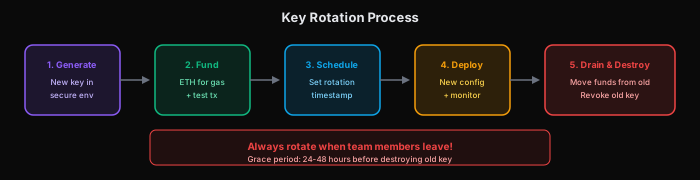
- Generate new key in secure environment
- Fund new address with ETH for gas
- Update provider registrations to new address
- Schedule rotation timestamp
- Deploy with new key configuration
- Monitor for any issues
- Drain old wallet after grace period
- Revoke/destroy old key
Multi-Signature Setup

For high-value operations, require multiple keys.
- TypeScript
- Python
import { ethers } from 'ethers';

interface MultiSigConfig {
  threshold: number;      // Required signatures (e.g., 2)
  signers: string[];      // All possible signers (e.g., 3)
}

class MultiSigCoordinator {
  private config: MultiSigConfig;
  private pendingSignatures: Map<string, string[]> = new Map();

  async proposeTransaction(tx: any): Promise<string> {
    const txHash = ethers.keccak256(ethers.toUtf8Bytes(JSON.stringify(tx)));
    this.pendingSignatures.set(txHash, []);
    return txHash;
  }

  async addSignature(txHash: string, signature: string, signer: string): Promise<boolean> {
    // Verify signer is authorized
    if (!this.config.signers.includes(signer)) {
      throw new Error('Unauthorized signer');
    }

    // Verify signature
    const recoveredSigner = ethers.verifyMessage(txHash, signature);
    if (recoveredSigner.toLowerCase() !== signer.toLowerCase()) {
      throw new Error('Invalid signature');
    }

    // Add signature
    const signatures = this.pendingSignatures.get(txHash) || [];
    signatures.push(signature);
    this.pendingSignatures.set(txHash, signatures);

    // Check if threshold reached
    return signatures.length >= this.config.threshold;
  }

  async executeIfReady(txHash: string): Promise<boolean> {
    const signatures = this.pendingSignatures.get(txHash);
    if (!signatures || signatures.length < this.config.threshold) {
      return false;
    }

    // Execute with collected signatures
    // Implementation depends on your multi-sig contract
    return true;
  }
}
import json
from dataclasses import dataclass
from typing import List, Dict
from eth_account.messages import encode_defunct
from web3 import Web3

@dataclass
class MultiSigConfig:
    threshold: int      # Required signatures (e.g., 2)
    signers: List[str]  # All possible signers (e.g., 3)

class MultiSigCoordinator:
    def __init__(self, config: MultiSigConfig):
        self.config = config
        self.pending_signatures: Dict[str, List[str]] = {}
        self.w3 = Web3()

    def propose_transaction(self, tx: dict) -> str:
        tx_hash = self.w3.keccak(text=json.dumps(tx, sort_keys=True)).hex()
        self.pending_signatures[tx_hash] = []
        return tx_hash

    def add_signature(self, tx_hash: str, signature: str, signer: str) -> bool:
        # Verify signer is authorized
        if signer not in self.config.signers:
            raise Exception("Unauthorized signer")

        # Verify signature
        message = encode_defunct(hexstr=tx_hash)
        recovered_signer = self.w3.eth.account.recover_message(message, signature=signature)
        if recovered_signer.lower() != signer.lower():
            raise Exception("Invalid signature")

        # Add signature
        signatures = self.pending_signatures.get(tx_hash, [])
        signatures.append(signature)
        self.pending_signatures[tx_hash] = signatures

        # Check if threshold reached
        return len(signatures) >= self.config.threshold

    def execute_if_ready(self, tx_hash: str) -> bool:
        signatures = self.pending_signatures.get(tx_hash)
        if not signatures or len(signatures) < self.config.threshold:
            return False

        # Execute with collected signatures
        # Implementation depends on your multi-sig contract
        return True
Security Checklist
Development
- Never commit
.envfiles - Use separate keys for dev/staging/production
- Rotate keys when team members leave
- Use test networks with worthless tokens
Production
- Use secret manager (not env vars)
- Enable audit logging
- Set up alerts for unusual activity
- Document key recovery procedures
- Regular security audits
Emergency Response
- Know how to revoke keys quickly
- Have backup keys pre-generated (stored securely)
- Document incident response procedure
- Test recovery process annually
Common Mistakes
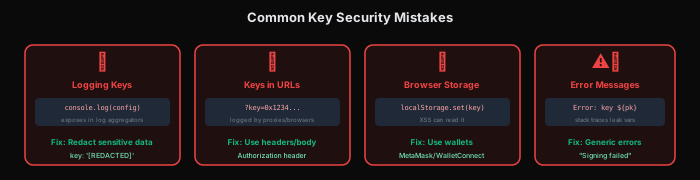
1. Logging Sensitive Data
- TypeScript
- Python
// ❌ Leaks in log aggregators
logger.info('Transaction params:', { privateKey, amount });

// ✅ Explicit redaction
logger.info('Transaction params:', { privateKey: '[REDACTED]', amount });
# ❌ Leaks in log aggregators
logger.info(f"Transaction params: {private_key=}, {amount=}")

# ✅ Explicit redaction
logger.info(f"Transaction params: private_key=[REDACTED], amount={amount}")
2. Keys in Error Stack Traces
- TypeScript
- Python
// ❌ Error might include sensitive vars in scope
async function sign(privateKey: string) {
  throw new Error('Failed'); // Stack trace might expose privateKey
}

// ✅ Clear sensitive vars before throwing
async function sign(privateKey: string) {
  let key = privateKey;
  privateKey = ''; // Clear original
  try {
    // Use key...
  } finally {
    key = ''; // Clear copy
  }
}
# ❌ Error might include sensitive vars in scope
def sign(private_key: str):
    raise Exception("Failed")  # Stack trace might expose private_key

# ✅ Clear sensitive vars before throwing
def sign(private_key: str):
    key = private_key
    private_key = None  # Clear original
    try:
        # Use key...
        pass
    finally:
        key = None  # Clear copy
3. Keys in URLs
- TypeScript
- Python
// ❌ Keys in URL params (logged by proxies, browsers)
const url = `https://api.example.com?key=${privateKey}`;

// ✅ Keys in headers or body
const response = await fetch(url, {
  headers: { 'X-Private-Key': privateKey }
});
# ❌ Keys in URL params (logged by proxies, browsers)
url = f"https://api.example.com?key={private_key}"

# ✅ Keys in headers or body
import requests
response = requests.get(url, headers={"X-Private-Key": private_key})
4. Keys in Browser localStorage
- TypeScript
- Python
// ❌ Accessible to any JavaScript on the page
localStorage.setItem('privateKey', key);

// ✅ Use secure storage or don't store at all
// For browser wallets: use MetaMask/WalletConnect
# ℹ️ localStorage is a browser-only concept
# Python backends should use secure alternatives:

# ❌ Don't store keys in plain files
with open("key.txt", "w") as f:
    f.write(private_key)

# ✅ Use environment variables or secret managers
import os
private_key = os.environ.get("PRIVATE_KEY")

# ✅ Or use keyring for system credential storage
import keyring
keyring.set_password("agirails", "wallet", private_key)
private_key = keyring.get_password("agirails", "wallet")